Login · Workflows · Transactions

MFA for Web Applications

Portals, intranets and business web apps are where most of your users spend their day — and where a stolen password does the most damage. We add strong authentication at sign-in, at workflow approval and at the moment a transaction is committed.
MFA for Web Applications — Login · Workflows · Transactions
The challenge

Why this one is hard.

Web applications are reachable from anywhere, which is exactly what makes them attractive. Credential stuffing, phishing kits and session hijacking all target the login page first, and a password alone gives an attacker everything the legitimate user has.

The harder problem comes after login. A session that was legitimately established can be used to approve a payment, change a beneficiary or export a customer list. Authenticating the person once, at the door, tells you nothing about who is driving the session an hour later.

What changes

BeforeAfter
A stolen password gets an attacker straight into the application.A stolen password is worthless without the registered device.
A hijacked session can approve any transaction silently.High-value actions need a fresh, out-of-band approval carrying the transaction detail.
Access evidence is spread across application logs.One authentication and approval trail across every application.
How it works

Four steps from decision to evidence.

01

Integrate

Connect the application over SAML, OAuth 2.0, OpenID Connect or our REST API. No change to your application's own user store is required.

02

Authenticate

The user completes primary authentication, then approves out of band on their registered device — push, QR, passkey or an offline code.

03

Bind the transaction

For sensitive actions, the approval request carries the transaction detail, so a user cannot be tricked into approving something they never saw.

04

Record

Every authentication and approval is written to a single audit trail your auditor can follow end to end.
Capabilities

What you get.

  • SAML 2.0, OAuth 2.0, OpenID Connect and REST API integration
  • Adaptive, risk-based step-up — challenge only when something is different
  • Transaction signing with the transaction detail shown in the approval
  • Nine authentication modes, including offline for users with no signal
  • Self-service enrolment through a branded QR-based portal
  • Social login for customer-facing portals (Google, Microsoft, LinkedIn, Apple)
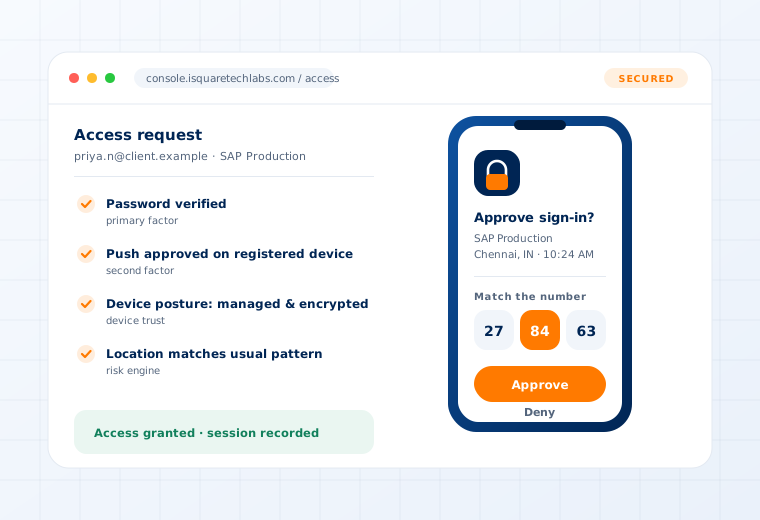
Access request verified through push approval, device posture and location checks

Supported

Protocols
SAML 2.0 · OAuth 2.0 · OpenID Connect · RADIUS · REST API
Directories
Active Directory · LDAP · Entra ID · Google Workspace · HR systems
Auth modes
PUSH · QR · FIDO2 passkey · CR-OTP · TOTP · POTP · GRID
Deployment
On-Premise · Private Cloud · As a Service
Questions

What buyers ask about this.

If yours is not here, our team will answer it directly.

Ask us
Usually not. If the application already speaks SAML, OAuth 2.0 or OpenID Connect, integration is configuration. Where an application supports none of those — common with older in-house systems — our REST API adds authentication with a small amount of integration work, which we scope up front.
Only if you want that. Policy is set per application and per risk level, so routine access from a known device on a known network can pass through while an unusual attempt is challenged.
The same platform covers customer authentication, including social login and fraud-resistant account recovery. Step-up is applied on risk rather than on every visit, which keeps ordinary journeys frictionless.
Related use cases

Often deployed alongside.

Single Sign-On

O365 · Mail · Cloud & legacy apps

Read more

Desktop & VDI

Windows · Linux · Horizon · VNC

Read more

Privileged Access

Vaulting · JIT elevation · Session recording

Read more

See this working on your own systems.

Bring the system you are worried about and we will show you exactly how this control would be applied to it.