Image-open and file-save blocking

Files, Images & OCR

On-device OCR reads tilted, low-contrast camera shots of cards and IDs. A sensitive image never opens, and a sensitive file never reaches the disk.
Files, Images and OCR — Image-open and file-save blocking
The challenge

Why this one is hard.

A photographed document is the exfiltration route that defeats text-based DLP entirely. A picture of a card, a passport or a customer record is just an image file as far as most controls are concerned.

Those photographs are rarely clean scans. They are taken at an angle, in poor light, on a phone — which is precisely the condition under which general-purpose OCR performs worst.

What changes

BeforeAfter
A photographed card slips past text-based DLP.OCR reads the image and the file never opens.
Nobody knows where sensitive files already sit.The baseline scan surfaces existing exposure on day one.
Random 16-digit strings trigger constant false alarms.Checksum validation removes them.
How it works

Four steps from decision to evidence.

01

Read the image

On-device OCR extracts text from images, tuned for the tilted, low-contrast shots people actually take.

02

Check before opening

A photo containing card or ID data is checked before it opens — it never appears on screen if it is sensitive. This works in any viewer.

03

Block the save

Saving a card or ID number to a file is blocked the instant it is attempted; the data never reaches the disk.

04

Scan the baseline

A baseline scan on install surfaces sensitive files that already exist across the fleet.
Capabilities

What you get.

  • On-device OCR built for card and ID photographs
  • Image-open blocking that works in any viewer
  • File-save blocking before data reaches the disk
  • Baseline scan on install, revealing existing exposure
  • 32+ detectors across 25 countries, checksum-validated
  • Evidence per finding with a masked preview
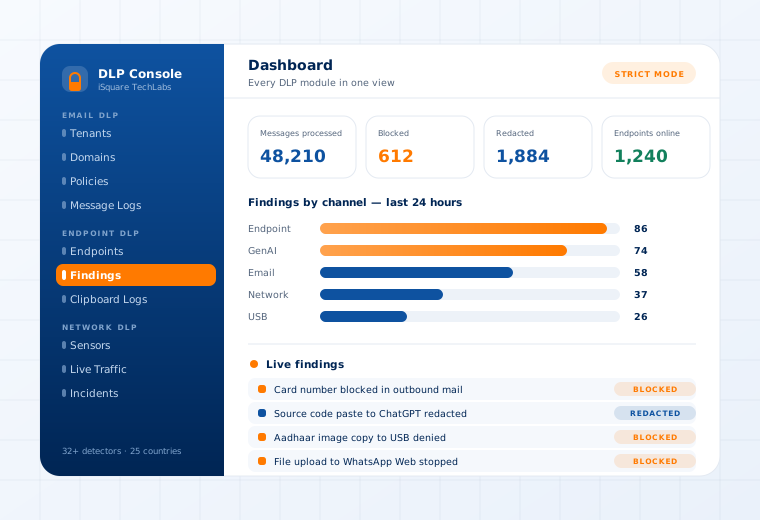
The Data Loss Prevention console showing findings by channel and a live findings stream

Supported

Detectors
32+ built-in · 25 countries · custom regex with test sandbox
Validation
Checksum validation on card and ID numbers
Findings tabs
Triggered Scan · Clipboard · Web Intercept · OCR Engine · USB Restriction
Operating systems
Windows · Linux · macOS
Questions

What buyers ask about this.

If yours is not here, our team will answer it directly.

Ask us
It is built specifically for that case — tilted, low-contrast camera shots rather than flatbed scans. That is a deliberate design choice, because the realistic threat is a phone photo, not a clean scan.
It fires automatically on first deployment and surfaces sensitive data that already exists across the fleet. Customers are routinely surprised by the result, which is usually the most persuasive part of a pilot.
No. The audit log records the file, user, time, action and a masked preview of the match. Raw personal data never leaves your database, which is what makes the evidence usable for a regulator.
Related use cases

Often deployed alongside.

Clipboard, Screenshot & Print

Kernel-enforced on the device

Read more

Removable Media

USB device-fingerprint registry

Read more

GenAI Guardrails

ChatGPT · Claude · Gemini · Copilot

Read more

See this working on your own systems.

Bring the system you are worried about and we will show you exactly how this control would be applied to it.