O365 · Mail · Cloud & legacy apps

Single Sign-On

One secure front door to every application — cloud, on-premises and hybrid — with federation, identity brokering and adaptive, policy-based access controls behind it.
Single Sign-On — O365 · Mail · Cloud and legacy apps
The challenge

Why this one is hard.

Password fatigue is a security problem, not just an annoyance. Users asked to remember a dozen application passwords reuse them, write them down, or choose variations an attacker can guess from one breach.

Identity sprawl makes it worse. When each application keeps its own user list, nobody can answer the two questions that matter during an incident: who has access to what, and has that access been revoked yet?

What changes

BeforeAfter
A dozen passwords per user, reused and written down.One strong sign-in, with the password removed entirely where you want it to be.
Each application keeps its own user list.One identity, one place to grant access and one place to revoke it.
Leavers keep access until somebody remembers.Deprovisioning flows from the HR system automatically.
How it works

Four steps from decision to evidence.

01

Federate

Connect applications over SAML, OAuth 2.0 or OpenID Connect, with the platform acting as the identity provider.

02

Broker

Where you already run Azure AD, ADFS or Google as an identity provider, the platform brokers to them instead of replacing them.

03

Apply policy

Adaptive, risk-aware rules decide whether a session passes through, is stepped up, or is refused.

04

Govern

Access is granted and revoked through identity lifecycle automation rather than by hand.
Capabilities

What you get.

  • Simplify access across cloud, on-premises and hybrid applications
  • Identity federation and SSO with SAML, OAuth 2.0 and OpenID Connect
  • Acts as an identity broker — connect to Azure AD, ADFS and Google
  • Social login support (Google, Microsoft, LinkedIn, Apple)
  • Secure access portal for employees, partners, vendors and customers
  • Adaptive, policy-based and risk-aware access controls
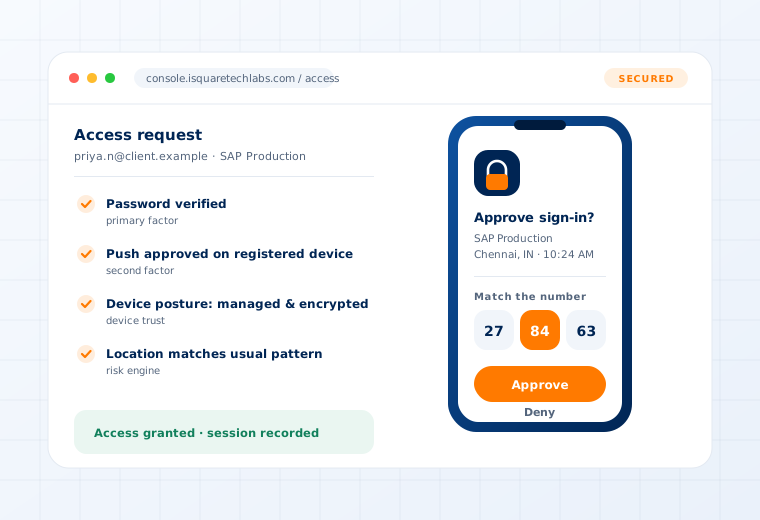
Access request verified through push approval, device posture and location checks

Supported

Protocols
SAML 2.0 · OAuth 2.0 · OpenID Connect · WS-Federation
Brokered IdPs
Azure AD / Entra ID · ADFS · Google Workspace
Applications
Microsoft 365 · mail · cloud SaaS · legacy on-premise apps
User types
Employees · partners · vendors · customers
Questions

What buyers ask about this.

If yours is not here, our team will answer it directly.

Ask us
Only if you want it to. The platform can act as an identity broker in front of Entra ID, ADFS or Google, which lets you add adaptive MFA and privileged access management without unpicking an SSO deployment you have already paid for.
Yes. The secure access portal supports employees, partners, vendors and customers, each governed by its own policy set, so a contractor is not held to the same rules as an employee — or given the same reach.
Legacy applications that support none of the standard protocols are integrated through our REST API or, where appropriate, through password vaulting so the user never sees the credential.
Related use cases

Often deployed alongside.

Web Applications

Login · Workflows · Transactions

Read more

Identity Lifecycle

Joiner · Mover · Leaver provisioning

Read more

Privileged Access

Vaulting · JIT elevation · Session recording

Read more

See this working on your own systems.

Bring the system you are worried about and we will show you exactly how this control would be applied to it.