RDP · SSH · Jump hosts

Remote Server Login — RDP & SSH

Harden administrative connections to Windows and Linux servers, brokered and recorded through privileged access management rather than left to a shared password and a jump host.
Remote Server Login — RDP and SSH — RDP · SSH · Jump hosts
The challenge

Why this one is hard.

RDP and SSH are the two protocols attackers most want once they are inside. They are legitimate, they are everywhere, and traffic over them looks like normal administration until something breaks.

Jump hosts were meant to solve this and mostly moved the problem. A compromised jump host is a compromised estate, and the shared credentials that live on it are rarely rotated and almost never recorded.

What changes

BeforeAfter
Shared root and administrator passwords circulate in chat.Credentials live in a vault and rotate automatically.
Standing admin rights, granted once and never reviewed.Time-boxed elevation against an approved reason.
An incident leaves no record of what was actually done.Every session is recorded and searchable.
How it works

Four steps from decision to evidence.

01

Authenticate

Administrators prove who they are with out-of-band MFA before any session is established.

02

Broker

The connection is brokered through the platform, so the administrator never needs the target credential.

03

Elevate just in time

Access is granted for a defined window against an approved reason, then expires on its own.

04

Record

The session is recorded with searchable keystroke and command logs.
Capabilities

What you get.

  • MFA in front of RDP and SSH access
  • Clientless session brokering without agents on every target
  • Credential vaulting so administrators never see the target password
  • Just-In-Time elevation with automatic expiry
  • Full session recording with searchable logs
  • Scoped, time-boxed access for third-party engineers
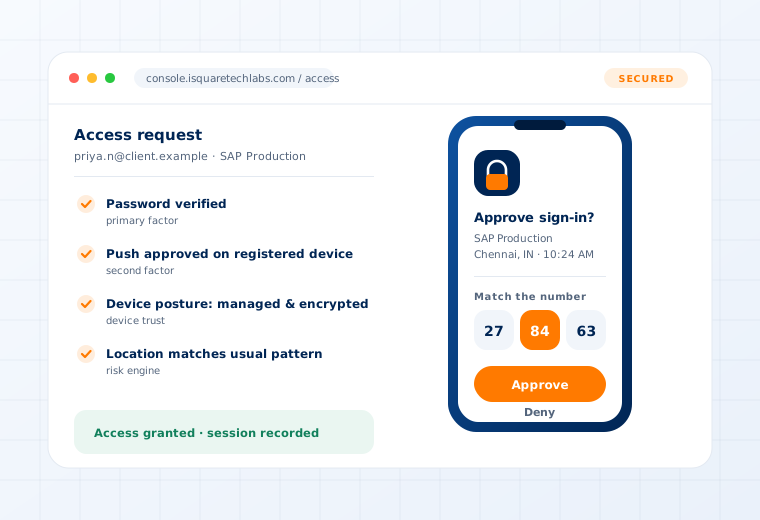
Access request verified through push approval, device posture and location checks

Supported

Protocols
RDP · SSH · VNC
Targets
Windows servers · Linux servers · network appliances
Access model
Clientless brokering — no agent required on each target
Evidence
Searchable keystroke and command logs per session
Questions

What buyers ask about this.

If yours is not here, our team will answer it directly.

Ask us
No. Sessions are brokered clientlessly, which is what makes this practical across servers you do not fully control — including appliances where installing an agent is not an option.
Yes, and this is one of the most common reasons customers deploy it. A third-party engineer gets scoped access to exactly one system for a defined window, recorded throughout, revoked automatically when the window closes.
Wherever your deployment model puts them — inside your own data centre for on-premise, in your own tenant for private cloud, or in the managed service. Retention is set by your policy.
Related use cases

Often deployed alongside.

Privileged Access

Vaulting · JIT elevation · Session recording

Read more

Device Administration

Network · NetApp · Cisco ISE · OT

Read more

See this working on your own systems.

Bring the system you are worried about and we will show you exactly how this control would be applied to it.