Kernel-enforced on the device

Clipboard, Screenshot & Print Control

Sensitive data is wiped from the clipboard the moment it is copied, and the print dialog closes on every path — keyboard shortcut and File → Print alike.
Clipboard, Screenshot and Print Control — Kernel-enforced on the device
The challenge

Why this one is hard.

Copy-paste and screen capture move personal data in milliseconds, entirely within the device. No network sensor sees them, and no email gateway is involved.

Printing is the oldest exfiltration route there is and still one of the least controlled. A document that cannot be emailed can usually still be printed, photographed and carried out.

What changes

BeforeAfter
A customer list is copied and pasted into a personal email.The clipboard is wiped before the paste can happen.
Sensitive documents are printed and carried out.The print dialog closes on every path.
Controls stop working when the laptop is offline.Kernel enforcement continues with no network at all.
How it works

Four steps from decision to evidence.

01

Enforce in the kernel

Protection is built into the operating system layer, so it applies before any application can read or move the data.

02

Wipe the clipboard

Sensitive content is cleared the instant it is copied, leaving no window in which to paste it.

03

Guard the print path

Sensitive content closes the print dialog on every route to it, not just the menu item.

04

Cover the screen

Screenshot and screen-share attempts on protected content are caught in the same way.
Capabilities

What you get.

  • Instant clipboard wipe on sensitive content
  • Print guard covering keyboard shortcut and menu paths alike
  • Screenshot and screen-share control
  • Kernel-level enforcement that applications cannot bypass
  • Works offline — no network dependency for enforcement
  • Audit evidence for every action taken
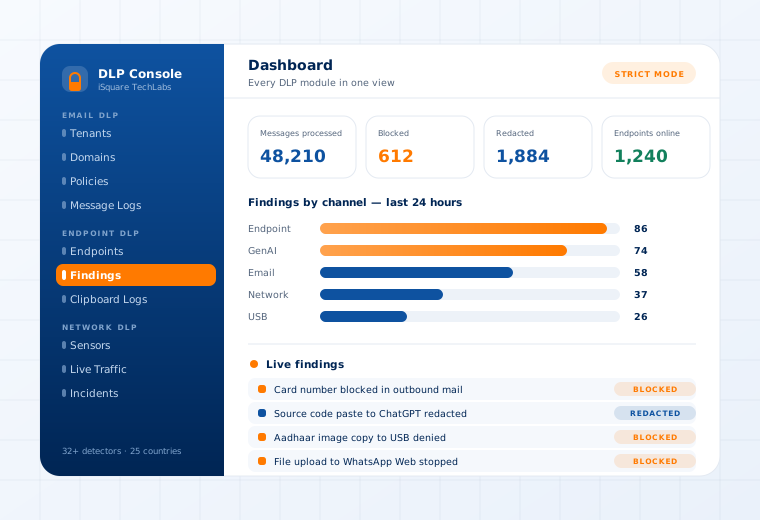
The Data Loss Prevention console showing findings by channel and a live findings stream

Supported

Channels
Clipboard · screenshot · screen-share · printer
Enforcement
Kernel and user-mode, simultaneously
Operating systems
Windows · Linux · macOS
Modes
Audit-only · Selective · Strict
Questions

What buyers ask about this.

If yours is not here, our team will answer it directly.

Ask us
Only when the content matches a detector. Ordinary text, code and documents move exactly as before — the clipboard is wiped only when it holds something the policy protects, such as a card or national ID number.
Enforcement runs at the operating-system layer specifically so that it cannot be bypassed by an application or a determined user. This is the main practical difference between kernel-enforced DLP and agent software that merely watches.
Yes. Policy is enforced locally, so a disconnected laptop is protected. Findings synchronise and policy updates apply when the device reconnects.
Related use cases

Often deployed alongside.

Removable Media

USB device-fingerprint registry

Read more

Files, Images & OCR

Image-open and file-save blocking

Read more

Messenger Control

WhatsApp · Telegram · Signal

Read more

See this working on your own systems.

Bring the system you are worried about and we will show you exactly how this control would be applied to it.