ChatGPT · Claude · Gemini · Copilot

GenAI Guardrails

Employees paste customer data into AI assistants every day. We inspect the prompt on the device — before it ever reaches the AI provider — and mask anything the model echoes back.
GenAI Guardrails — ChatGPT · Claude · Gemini · Copilot
The challenge

Why this one is hard.

Blocking AI tools outright does not work. Staff move to personal devices, and the organisation loses both the productivity and any visibility of what is being shared.

Inspecting the traffic does not work either, at least not from the network. All AI traffic is HTTPS-encrypted, and modern assistants bury the prompt inside streaming JSON request bodies that a simple content filter never sees.

What changes

BeforeAfter
AI tools are banned, and used anyway on personal devices.AI tools are allowed, with secrets stripped before they leave.
Nobody knows what staff have pasted into an assistant.Every blocked and redacted prompt is evidenced.
A model echoes a card number back onto the screen.The echo is masked before the user sees it.
How it works

Four steps from decision to evidence.

01

Inspect on the device

The endpoint agent examines prompt content in the browser and at the network layer on the endpoint, before encryption.

02

Understand the vendor

Vendor-aware inspection extracts prompts hidden inside streaming JSON bodies, not just plain text boxes.

03

Block or redact

Sensitive text or images are blocked before the prompt is sent, according to the policy mode in force.

04

Mask the reply

If the model echoes back a card or ID number, it is masked on screen so the user sees a redaction, never the secret.
Capabilities

What you get.

  • Prompt-leak blocking for text and images before the prompt is sent
  • AI-reply redaction so echoed secrets never appear on screen
  • Vendor-aware inspection of streaming JSON request bodies
  • Enforced in the browser and at the endpoint network layer
  • Works despite HTTPS encryption, because inspection is on-device
  • Audit evidence for every blocked or redacted prompt
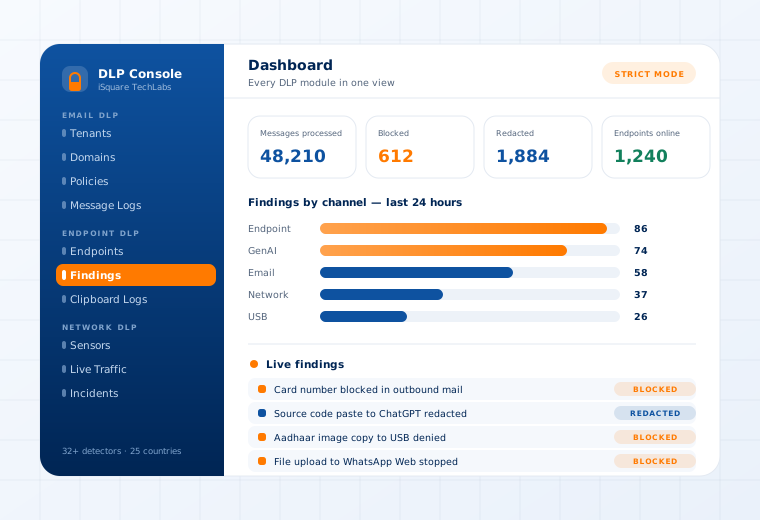
The Data Loss Prevention console showing findings by channel and a live findings stream

Supported

AI tools
ChatGPT · Claude · Gemini · Copilot · Perplexity
Operating systems
Windows · Linux · macOS
Enforcement points
Browser layer · endpoint network layer
Modes
Audit-only · Selective (silent redaction) · Strict (hard block)
Questions

What buyers ask about this.

If yours is not here, our team will answer it directly.

Ask us
No, and that is the point. Banning the tools pushes the behaviour onto personal devices where you have no visibility at all. This lets staff keep using assistants while source code, credentials and customer records are stripped out of the prompt.
Inspection happens on the device, before the browser encrypts anything, and inside the browser itself. Encryption in transit is irrelevant because the content is examined earlier in the chain.
Vendor-aware inspection covers the major assistants out of the box, and the pattern catalogue and host lists are updated centrally — changes propagate to endpoints by heartbeat within seconds, with no re-install.
Related use cases

Often deployed alongside.

Messenger Control

WhatsApp · Telegram · Signal

Read more

Clipboard, Screenshot & Print

Kernel-enforced on the device

Read more

Files, Images & OCR

Image-open and file-save blocking

Read more

See this working on your own systems.

Bring the system you are worried about and we will show you exactly how this control would be applied to it.