WhatsApp · Telegram · Signal

Messenger Control

Most DLP fails here, because these apps encrypt the file on the device and the network only ever sees scrambled data. We close the gap with three independent layers — all three must be beaten to leak a file.
Messenger Control — WhatsApp · Telegram · Signal
The challenge

Why this one is hard.

End-to-end encrypted messengers are the single hardest channel in data loss prevention. By the time an upload reaches a network sensor the file is already ciphertext: there is nothing to inspect and nothing to block.

They are also, for the same reason, where deliberate exfiltration goes. A file dropped into a chat window leaves no trace a conventional DLP deployment can act on.

What changes

BeforeAfter
An encrypted upload is invisible to network DLP.The file is caught in the browser before encryption.
Sensitive text pasted into a chat goes unnoticed.The screen-guard layer reads the chat window and stops it.
One control, one bypass.Three independent layers, all of which must fail.
How it works

Four steps from decision to evidence.

01

Browser layer

Files are caught in the browser — file picker, drag-drop or paste — before the web app can read them. Over 20 high-risk sites are covered.

02

Network layer

Uploads to messaging and file-sharing sites are blocked at the network layer, even when the file is encrypted.

03

Screen-guard layer

The chat window on screen is read, catching sensitive text typed or pasted into a message before it is sent.

04

Evidence

Each interception is recorded with the file, user, time, action and a masked preview of the match.
Capabilities

What you get.

  • Three independent enforcement layers, each sufficient on its own
  • Blocks file uploads before the messaging app can encrypt them
  • Catches sensitive text typed or pasted directly into a chat
  • Covers 20+ high-risk messaging and file-sharing hosts
  • Works on Windows, Linux and macOS from a single agent
  • Full evidence trail for every interception
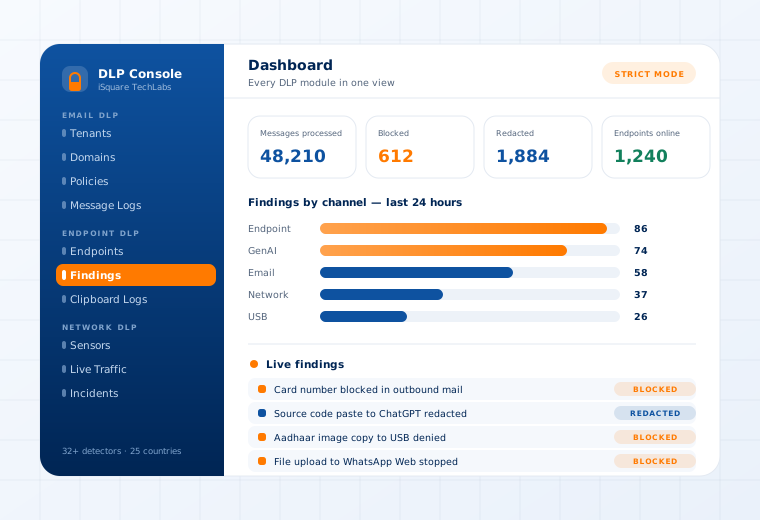
The Data Loss Prevention console showing findings by channel and a live findings stream

Supported

Messengers
WhatsApp · Telegram · Signal · Messenger · Discord
File sharing
Dropbox · MEGA · WeTransfer · Pastebin and others
Layers
Browser · endpoint network · on-screen guard
Operating systems
Windows · Linux · macOS
Questions

What buyers ask about this.

If yours is not here, our team will answer it directly.

Ask us
Because each one has a bypass and they are different bypasses. A user who avoids the browser layer still meets the network layer; someone who types rather than uploads still meets the screen guard. An attacker has to defeat all three in the same action.
In audit-only and selective modes, no — staff keep working and sensitive content is logged or silently redacted. Strict mode hard-blocks with an on-screen notice. Most customers start in audit-only and tighten once they have seen the real traffic.
Yes. Group-based policy binds a detector profile to a department, so Finance and Engineering can be held to different rules from the same console, and a device's group decides which policy it enforces.
Related use cases

Often deployed alongside.

GenAI Guardrails

ChatGPT · Claude · Gemini · Copilot

Read more

Files, Images & OCR

Image-open and file-save blocking

Read more

Clipboard, Screenshot & Print

Kernel-enforced on the device

Read more

See this working on your own systems.

Bring the system you are worried about and we will show you exactly how this control would be applied to it.